A ChatGPT Search Console now exists under another name: Business Hub, which OpenAI launched in beta on November 10, 2026, shows a verified business how often ChatGPT mentioned it and how many times people clicked links to its website over the past 28 days. It first surfaced as an unreleased test on November 6, and this piece now covers what launched.
When did OpenAI launch Business Hub?
On November 10, 2026, when it announced Businesses in ChatGPT in beta. Four days earlier, Juozas Kaziukėnas, founder of the e-commerce research firm Marketplace Pulse, had posted a screenshot of the unreleased sign-up page on LinkedIn, headed "Claim your business in ChatGPT." Barry Schwartz wrote it up for Search Engine Roundtable that morning.
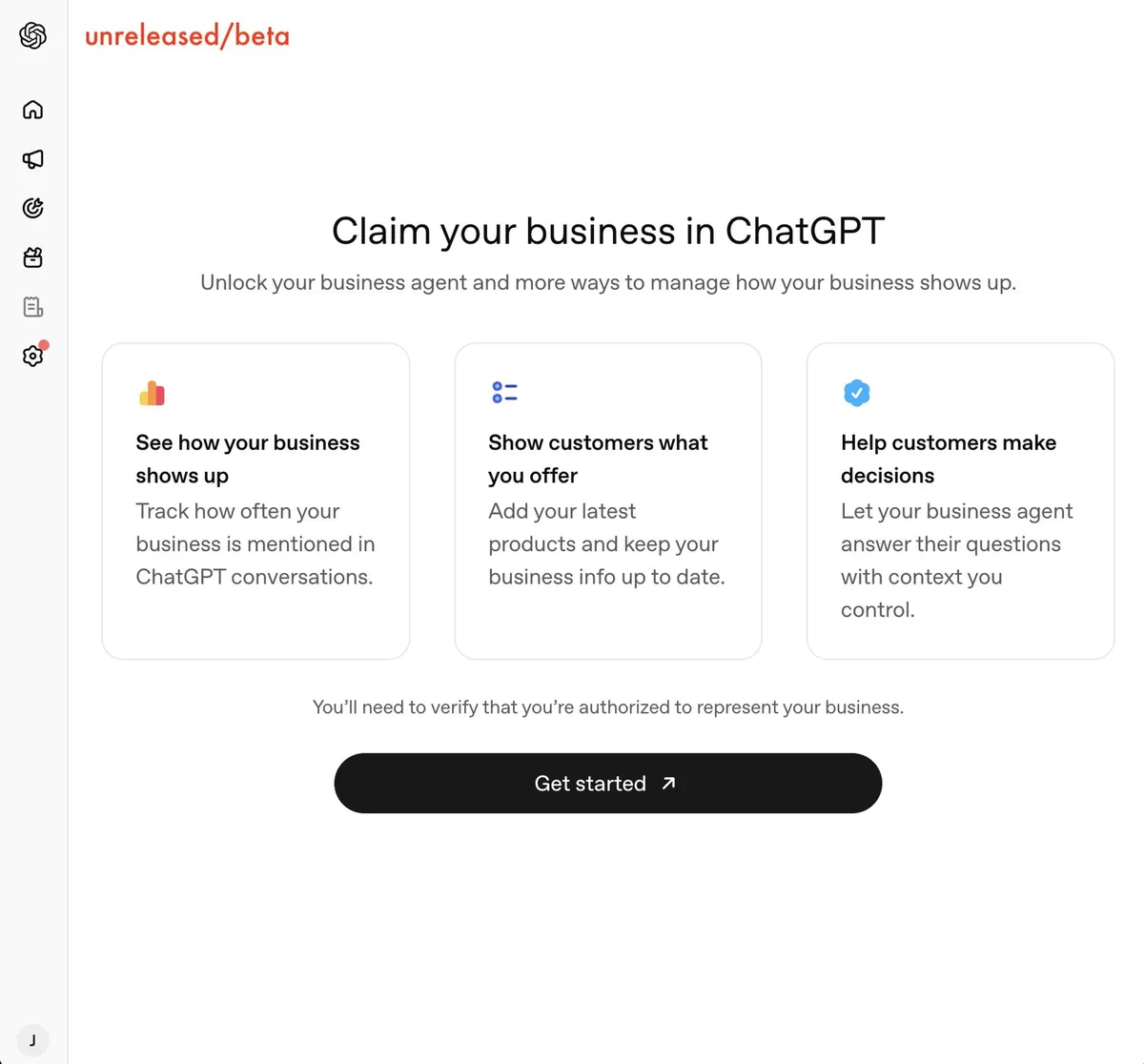
The launch kept the screenshot's three cards. In OpenAI's launch post: "Once verified, you can create a Business Agent, update your business details, and add product feeds with current pricing and availability." The working details sit in OpenAI's help article, Setting up your business on ChatGPT.
It's a free beta for now. Benji Shomair, OpenAI's vice president of monetization, told Digiday he hadn't ruled out charging later and gave no timeline for taking Business Agents wider. Expect the rules below to move.
What does the ChatGPT business dashboard show?
Three counts and a list of topics, all for the past 28 days, plus the tools to manage your profile:
| What Business Hub shows | What it doesn't show |
|---|---|
| Mentions: for an online business, times ChatGPT referenced its website; for a local business, times ChatGPT showed a result for that location | The prompts behind those mentions |
| Website clicks: recorded clicks on links to your site from ChatGPT | Anything about the people asking |
| Profile views, which OpenAI hasn't defined | A benchmark or ranking against competitors |
| Discovery topics: common themes in conversations where your business is cited | Why a number rose or fell |
| Business details you can edit, product feeds and a Business Agent | More than 28 days of history |
Read the definition of a mention twice. OpenAI says an online brand's name alone doesn't count: ChatGPT has to reference the website. A local business counts when ChatGPT shows a result for that location, even if nobody opens it.
A blank number isn't necessarily zero. OpenAI reports numbers only once activity clears a minimum threshold, and it hasn't published the threshold.
Kaziukėnas's pre-launch read still holds: the dashboard won't explain why mentions move, but next to outside prompt tracking it gives first-party evidence of whether GEO (generative engine optimization: the work of getting a business named and cited in AI answers) is doing anything.
The Business Agent is the narrowest part. At launch only eligible U.S. e-commerce and online service businesses can publish one, and its chats are labeled and kept separate from ChatGPT's own answers. Google is chasing the same idea: its guidance on AI search mentions Business Agent, a chat inside Search where customers talk to a brand, which we covered in what Google's GEO guidance leaves out. Both companies want the business's own facts inside the conversation.
How do you add products to ChatGPT?
With a product feed, and Shopify is optional. When we opened Business Hub's "Add products to ChatGPT" screen on November 12, it offered three ways in:
- Upload a product data file: "Import a Parquet file or a text feed from your device."
- Use a hosted URL: "Keep products updated from a file hosted online."
- Connect with SFTP, for a team that pushes files from its own servers.
A Shopify store can sync its catalog instead. The file follows OpenAI's product feed spec, which lists nine fields as required for a useful discovery feed: item_id, title, description, url, brand, seller_name, image_url, availability and price. OpenAI's file upload guide prefers Parquet, also takes gzipped JSONL, CSV and TSV, and recommends a full catalog snapshot at least daily.
That cadence favors the hosted URL or SFTP, because a file uploaded by hand goes stale the first time a price changes. A dentist or an HVAC company can skip feeds entirely.
Is it really a Search Console for ChatGPT?
Partly. It's the first report from OpenAI that any verified business can open to see its own ChatGPT numbers, and the only AI report from the three big platforms to count clicks. Like Search Console's Generative AI report, it leaves out the searches behind the numbers, and it keeps far less history.
| Google Search Console, Generative AI report | Bing Webmaster Tools, AI Performance | ChatGPT Business Hub | |
|---|---|---|---|
| Status | Live for all sites since August 31, 2026 | Public preview since February 2026 | Beta since November 10, 2026 |
| Counts appearances | Impressions in AI Overviews and AI Mode | Citations in Copilot and Bing's AI answers | Mentions: your website referenced, or your location shown |
| Counts clicks | Not in this report: they sit in the main Performance report, blended with everything else | No | Yes |
| Shows the searches | No | Yes, as grounding queries (the short searches the AI ran to find sources) | No prompts; discovery topics give themes |
| Who gets it | Any verified site | Any verified site | Businesses that pass an ownership check and a Persona ID check |
So the nickname fits the shape: free, first-party, owners only. What made Search Console indispensable was its queries tab, and discovery topics don't fill that role. History is the other gap: Search Console keeps 16 months, and Business Hub shows 28 days. For query-level AI data today, Bing's report is the free option, and our guide to Bing's AI Performance report has the monthly loop.
What will the numbers look like?
Lots of mentions and few clicks, if OpenAI's existing reports are a guide. OpenAI already sends per-URL visibility reports to a small group of publisher partners. Vincent Terrasi reviewed one month of one, for a large media publisher, and wrote it up for Search Engine Journal in December 2025. The top URL had 185,000 conversation impressions and 3,800 clicks, about 2 percent. Links inside the main answer drew click rates from 0.01 to 1.6 percent; links in the sidebar and citation lists drew 6 to 11 percent, on far fewer impressions. His summary: "The more frequently OpenAI displays your content, the fewer clicks it generates."
That was a publisher's report, and Business Hub counts its own way. Its dashboard tooltip carries a warning about clicks: "Clicks don't confirm website visits or conversions."
Plan for a click rate that looks broken. A business can be named in hundreds of answers, see a handful of clicks and still get the calls, because people read the answer, then search the name or pick up the phone. Log mentions and clicks as separate lines, and don't divide one by the other to grade the channel.
Who can claim a business in ChatGPT?
Owners and authorized representatives of eligible businesses, wherever ChatGPT is available, with one large exception. In OpenAI's words: "Local stores and restaurants can currently claim only an existing U.S. listing." There's no option yet to add a local business that isn't listed. An eligible online business may see one.
Claiming takes two checks. The first proves the business is yours, using whichever routes Business Hub offers for it: a code by text or automated call to the business phone, a business email, a TXT record added to your domain's DNS, or a connected Shopify store. Before launch, Shopify was the only reported route; a service business can now use phone, email or domain. The second check is identity, through Persona, and OpenAI requires it before you can publish changes, see the numbers or create a Business Agent. Early users on OpenAI's developer forum report failed Persona checks and domain checks that time out before DNS changes spread, so if one route stalls, try another.
Two things to settle before you start.
The name will confuse people. OpenAI calls the program Businesses in ChatGPT and the dashboard Business Hub. ChatGPT Business is its workplace subscription for teams, and it has nothing to do with either.
Decide who does the claiming. The person who claims a business can add teammates, each on their own ChatGPT account, so nobody ever needs anyone else's login. That leaves two routes: claim it yourself and add outside help afterwards, or have someone do the whole registration and add you once it's complete, to take it over or run it alongside them. Either way, the business should end up with full control of its own listing.
Does claiming your business help you show up in ChatGPT?
OpenAI says claiming doesn't guarantee higher placement or sales, and ChatGPT keeps making its own recommendations. Getting named still runs through the same work: rank in the web searches ChatGPT runs before it answers, publish pages it can lift a clean answer from, and keep your facts consistent across the sites it checks. That's the subject of how to get cited by ChatGPT, and if you're missing from answers altogether, start with why your business isn't showing up in ChatGPT.
Claiming does decide who corrects the record. OpenAI's Businesses in ChatGPT Terms let it create and display a listing for your business whether or not you claim it, so skipping Business Hub won't keep you out of ChatGPT. It only leaves the listing to OpenAI.
Paying won't change the answers either. OpenAI sells ChatGPT ads and says they don't influence ChatGPT's answers. The two products do meet: a Business Agent can be the destination of a ChatGPT ad, in a test with selected advertisers, and Shomair told Digiday the agent behind the free and paid versions "should be the same." Verification also gives OpenAI a direct relationship with businesses and their product data, so watch where Business Hub ends up.
What the dashboard changes is accountability. First-party numbers make it harder for anyone selling GEO, us included, to claim results they can't show. Buyers who've paid for "AI visibility" on the strength of a few prompt screenshots should welcome that.
What should you do now?
Record your baseline before you claim. Business Hub shows only the past 28 days, so your own export is the only longer before picture you'll have. The GA4 setup that isolates chatgpt.com visits is in our guide to measuring AI search traffic.
Copy this into the sheet you'll keep the numbers in.
CHATGPT BUSINESS HUB CHECKLIST (narsilcreative.com)

BASELINE (before you claim)
[ ] GA4: last 90 days of sessions from chatgpt.com, by landing page
[ ] Same date range: leads or orders from those sessions
[ ] Export saved with the date in the file name

CLAIM
[ ] Claimed by you, or by whoever is registering it for you
[ ] Ownership verified: business phone, email, domain or Shopify
[ ] Persona identity check passed (needed for edits and insights)
[ ] Everyone who needs access added as a teammate, on their own login
[ ] The business itself has full control of the listing
[ ] Local store or restaurant? Claim the existing U.S. listing

PROFILE AND PRODUCTS
[ ] Business name as customers know it, plus the legal name
[ ] Hours, service area and phone, matching your Google Business Profile
[ ] Selling products? Feed built to OpenAI's spec, nine required fields
[ ] Feed delivered by hosted URL or SFTP, refreshed at least daily

EVERY FOUR WEEKS (the dashboard keeps 28 days)
[ ] Log mentions, profile views and clicks as separate lines
[ ] Note the top discovery topics
[ ] Compare its clicks with GA4's chatgpt.com sessions, same dates
[ ] Read Bing Webmaster Tools AI Performance alongside
[ ] Ask ChatGPT ten buyer questions; note if you're named
Most businesses don't need outside help with any of this. It's an afternoon for whoever already runs your Google Business Profile.
We run this baseline in Assay, the first phase of the Reforge Method, and we'll update this page as OpenAI changes what Business Hub reports or who can use it.